Technical GEO Checklist: AI Crawlers, robots.txt, Schema and llms.txt
M. Zeeshan, Founder of GEOREX AI
Generative Engine & AI Search Intelligence
Share:
"Technical GEO means making sure AI search crawlers can reach, read and trust your pages. In practice: allow the search bots you want in robots.txt and at your CDN, serve the main content in the first HTML response, and keep structured data accurate to what the page shows."
Key takeaways
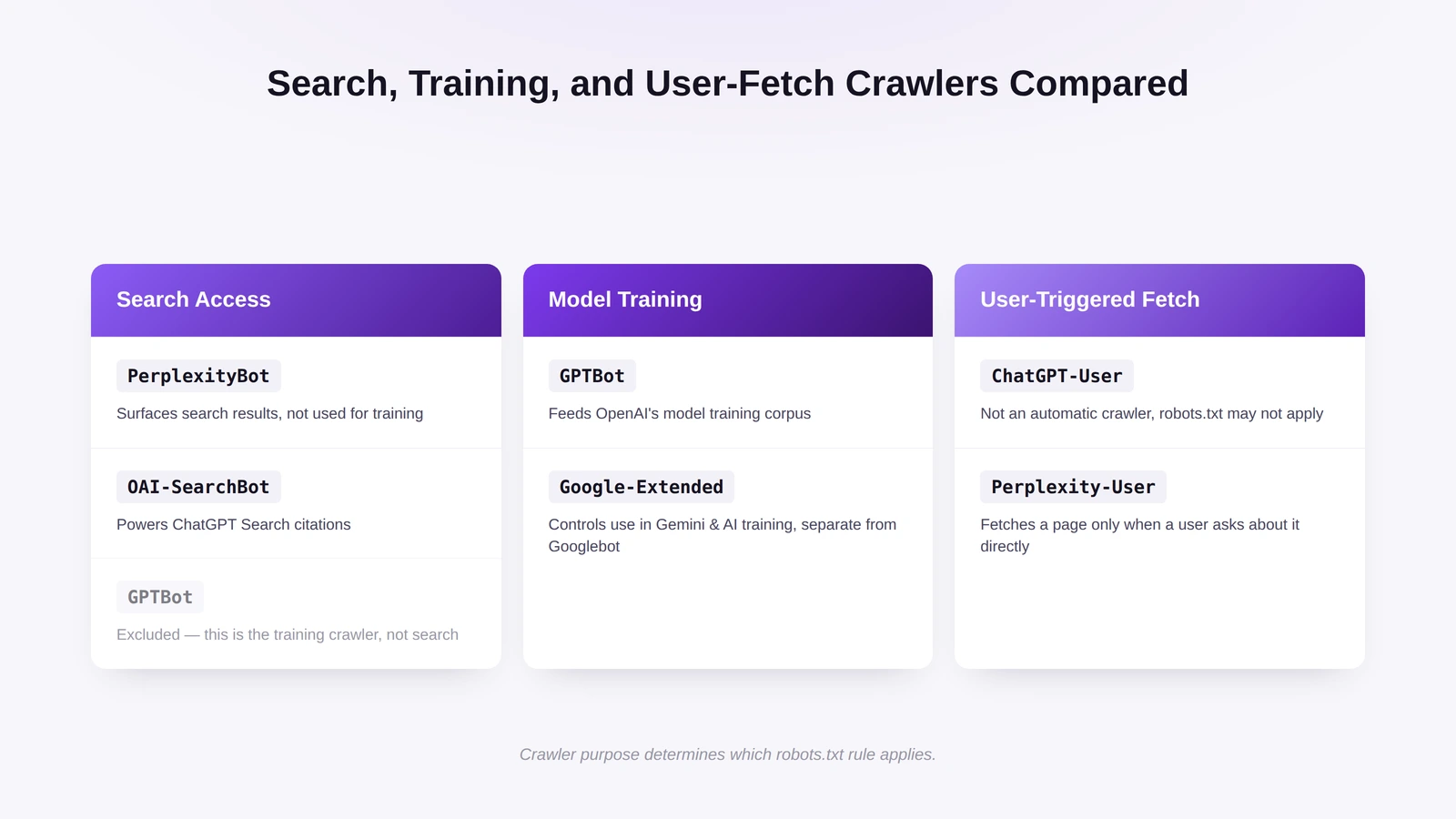
Every AI vendor runs separate crawlers for search, model training and user-triggered fetches, and each can be allowed or blocked on its own.
Blocking Google-Extended or GPTBot opts you out of model training; it does not remove you from Google Search or ChatGPT search.
A CDN or firewall can block a crawler that robots.txt allows. Since July 2025, Cloudflare blocks AI crawlers by default unless the owner allows them.
Put the main content in the server-rendered HTML; not every crawler runs JavaScript the way Googlebot does.
Schema markup and llms.txt describe content to machines, but neither is a proven ranking or citation factor.
Which AI crawlers serve search, training or user-triggered fetches?
Decide each rule by the documented job of each user agent: search (the bot that lets an AI engine find and cite you), training (content that may be used to train models) or user-triggered (a fetch made because a user asked about a page). Blocking one job does not block the others. For where this fits in the wider discipline, see our guide to generative engine optimization.
M. Zeeshan, Founder of GEOREX AI
Author
Founder of GEOREX AI, an AI visibility platform that tracks how brands actually appear across ChatGPT, Claude, Perplexity, and Gemini, and turns the gaps it finds into a prioritized action plan.
Boost Your Brand in Generative Search
Turn AI engines into your highest-converting acquisition channel.
GEOREX monitors how ChatGPT, Gemini, Google AI Overviews, Perplexity, and Claude cite your brand across thousands of real buyer queries and provides actionable optimization playbooks.
How do you write robots.txt rules without blocking AI search?
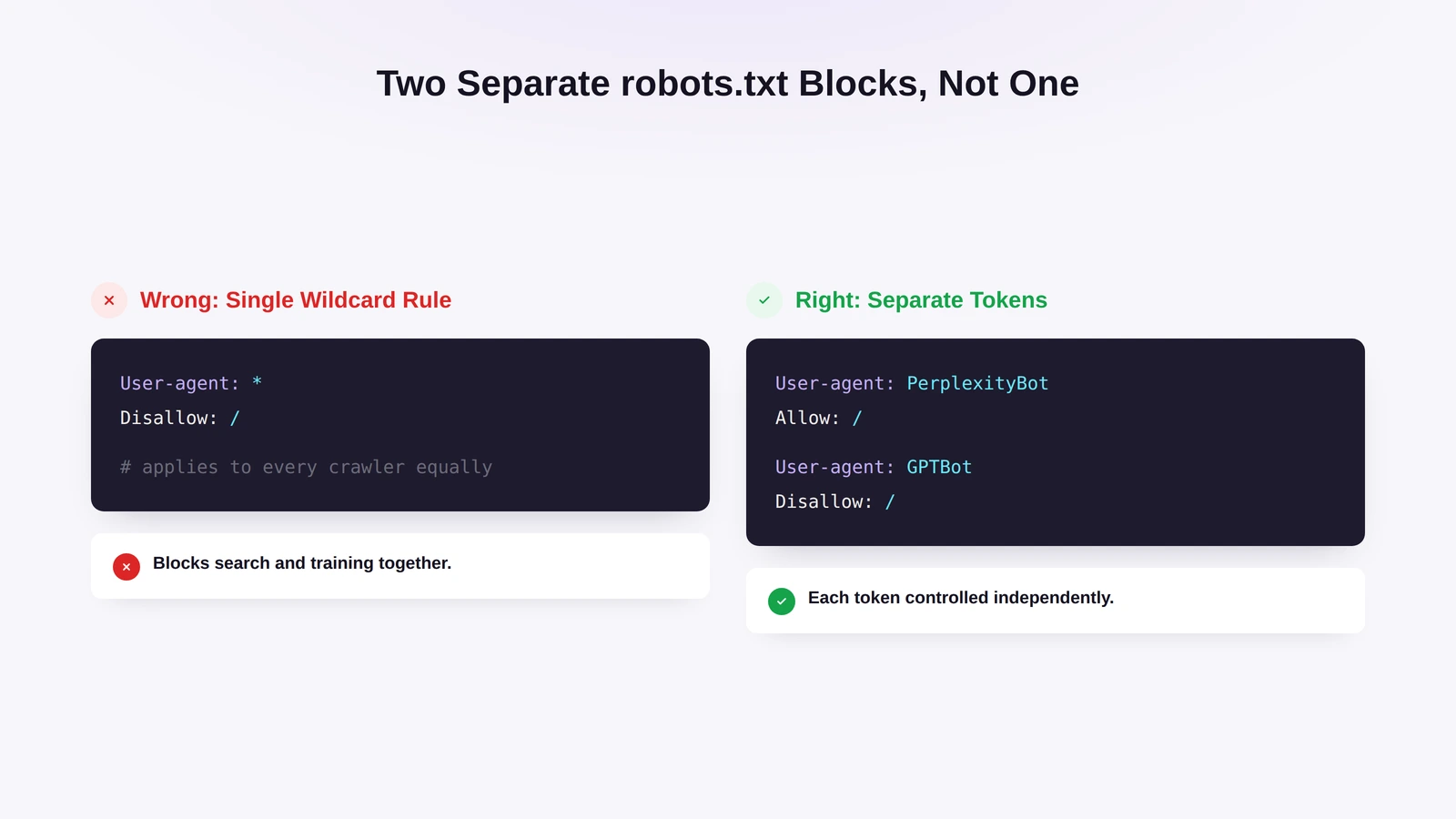
Give each token its own group. A single wildcard rule makes it easy to block a search crawler you wanted to keep. Leave Googlebot alone: Google-Extended is a separate token, and blocking it does not touch Google Search inclusion or rankings, while blocking Googlebot would cost you organic visibility.
One group per crawler, not one rule for all
Example: allow AI search, block training
This setup keeps every documented search crawler and opts out of model training:
PerplexityBot stays allowed because Perplexity documents it as a search crawler, not a model trainer. GPTBot is disallowed because OpenAI documents it as crawling for model training, and Applebot-Extended is disallowed as Apple's opt-out from foundation-model training, which does not affect eligibility for Apple search results. If you are happy for your content to be used in training, simply leave those groups out.
Treat user-triggered fetchers separately
User-triggered fetchers work on behalf of a person who asked an AI assistant about your page, so robots.txt is not a reliable control for them. OpenAI says robots.txt rules may not apply to ChatGPT-User, and Perplexity says Perplexity-User generally ignores robots.txt. In most cases you want these fetches to succeed, because a user is already asking about you. If you do need to block one, use a CDN or firewall rule matched to the vendor's user agent and published IP ranges.
What should your CDN, firewall and server logs allow or block?
Your CDN and web application firewall (WAF) rules should match your robots.txt. A common failure: robots.txt says "allow", but a bot-management rule drops the request before it reaches your server.
Check edge rules before changing origin settings
List every CDN or WAF rule that mentions AI user agents or IP ranges.
Compare that list with robots.txt line by line. Any crawler allowed in one and blocked in the other needs a decision.
Check platform defaults. Cloudflare announced in July 2025 that AI crawlers are blocked by default unless the site owner grants permission (press release). Its AI bot settings now separate search bots from training and agent bots, so check which categories your zone blocks.
For fetchers that ignore robots.txt, write firewall rules on the user agent and the vendor's published IP ranges together, as Perplexity recommends for Perplexity-User.
Make sure rate limits don't throttle crawlers you want during traffic spikes; in the logs a hard rate limit looks the same as a block.
Verify requests in your logs
Filter server or CDN logs by user agent and confirm that allowed crawlers get HTTP 200, not 403, a challenge page or a redirect loop.
Check the requesting IP against the vendor's published ranges when the user agent alone can't prove the request is genuine.
Repeat this after any CDN plan change, WAF update or new platform default.
How should pages be rendered so AI crawlers can read them?
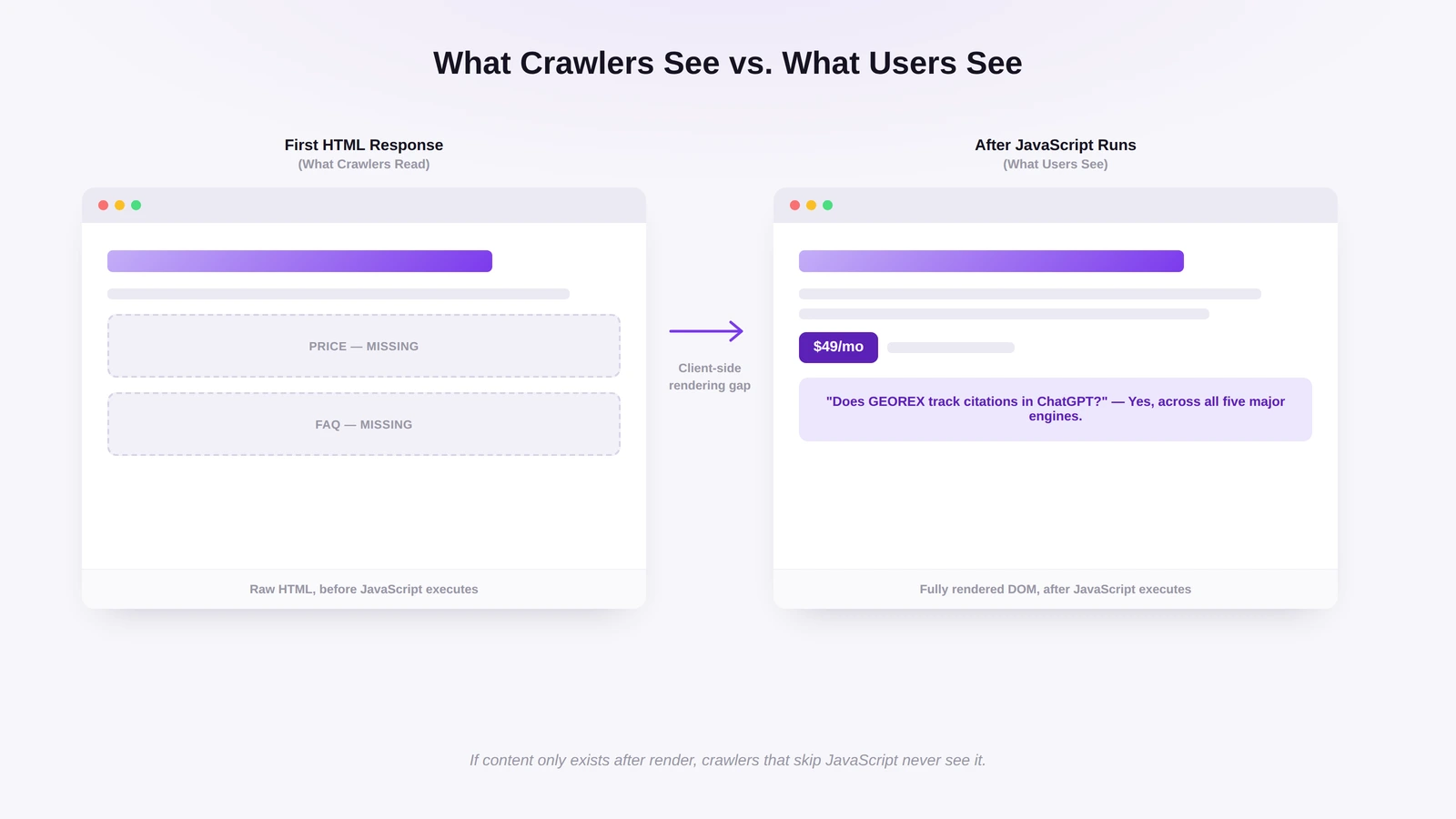
Put the core content (headings, body copy, prices, FAQ answers) in the first HTML response, not only after JavaScript runs. Google's crawler renders JavaScript, yet Google still recommends server-side rendering or pre-rendering because not every bot can run scripts (Google Search Central).
What a non-rendering crawler reads vs what a visitor sees
Use server-side rendering or pre-rendering so the initial HTML already contains the full text, not placeholder elements.
Make sure details in your Product markup (price, availability) are also in the raw HTML.
Use plain <a href="..."> links for internal navigation; JavaScript-only navigation can hide whole sections from bots that don't render.
Keep lazy-loaded text in the HTML even if it is shown later.
Avoid content that appears only after a click or scroll; crawlers don't click or scroll.
Test the HTML response, not the browser view
What you see in Chrome is not what a non-rendering crawler receives. Test the raw response:
Run curl -A "Claude-SearchBot" https://www.example.com/page and read the output.
Compare it with "View Page Source", not the rendered Elements panel in DevTools.
Confirm that body text, FAQ answers and structured data are in that raw HTML.
A typical failure is a pricing page built as a single-page app: the raw HTML is an empty shell with loading placeholders and no prices or plan names, so there is nothing for an answer engine to cite. Server rendering fixes it at the source.
What can schema markup and llms.txt realistically do?
Both describe your content to machines; neither guarantees that an AI engine will cite or recommend you. Google says there are no extra requirements to appear in AI Overviews or AI Mode: no special schema markup and no AI-specific file (Google Search Central). The same Search basics apply.
Keep schema accurate to the page
Structured data works best when it mirrors the visible content exactly. Use the schema.org types that match what a reader sees: Organization for company details, Product for pricing and availability, Article for blog posts and guides, and FAQPage for genuine question-and-answer sections. If the markup claims a price, rating or author that the page doesn't show, it can be ignored or distrusted. Treat schema as a description of what the page already says, not a way to make a weak page look stronger.
Set realistic expectations for llms.txt
llms.txt is a proposed file format placed at the site root that gives language models a curated, readable list of a site's key pages. It is a proposal, not an official standard, and none of the crawler documentation from OpenAI, Anthropic, Perplexity, Google or Apple cited here says the file is read or used for ranking. Adding one is cheap and harmless, but treat it as a bet on future adoption, not a visibility lever. Accurate schema, crawlable HTML and clean robots.txt rules come first.
How do sitemaps, canonicals, noindex and nosnippet fit in?
They control indexing and display, not crawl access. A crawler can be allowed in robots.txt and still be told not to index a page or not to show a snippet; those are separate, deliberate decisions.
List only canonical, indexable URLs in your XML sitemap, and drop parameter variants and thin tag pages.
Point rel=canonical at the version you want cited. If a page exists at several URLs (tracking parameters, print view), pick one.
Use noindex only on pages you want out of search and AI answers, such as internal search results or staging pages.
Review nosnippet and data-nosnippet. In Google, a page that can't show a snippet can't be shown as a source in AI Overviews either; for the full eligibility rules see how to get cited in Google AI Overviews.
Re-check these after any migration or CMS change; canonical and noindex rules break silently more often than robots.txt does.
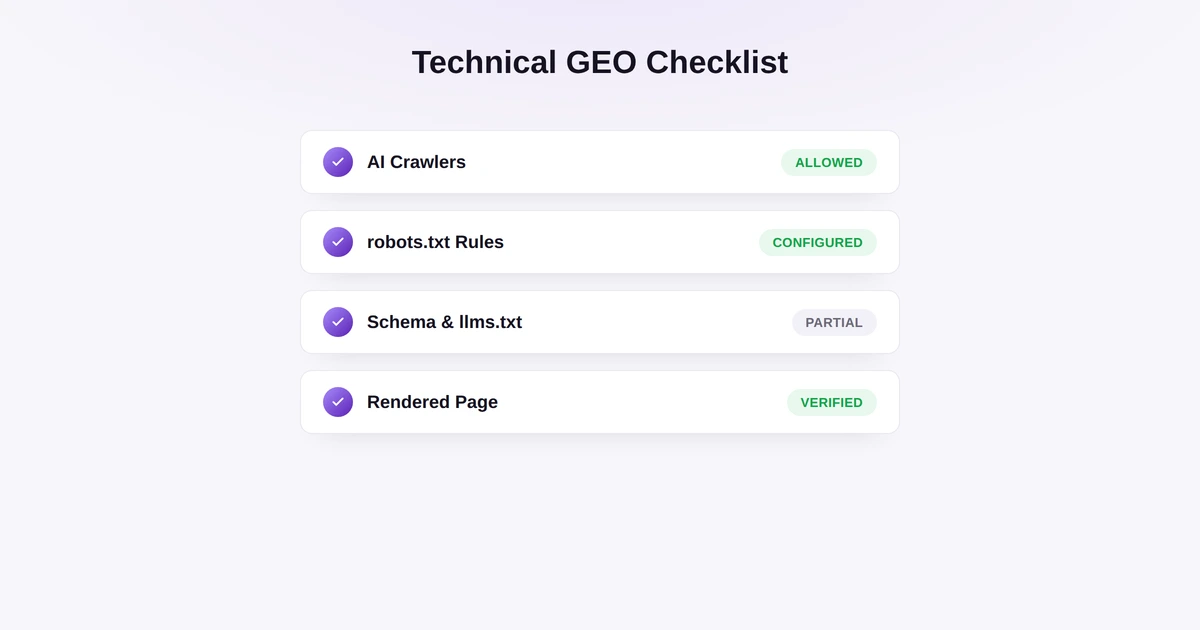
What should you verify before calling the setup complete?
A technical GEO setup is ready when crawler access, rendering and structured data check out against live requests, not just config files.
Server logs show OAI-SearchBot, Claude-SearchBot and PerplexityBot getting HTTP 200, not 403 or a challenge page.
robots.txt, CDN and WAF rules agree for every AI user agent you care about.
On Cloudflare, AI bot settings are set on purpose, not left on the default.
"View Page Source" shows the main content, titles and structured data without JavaScript.
Structured data matches the visible text; the sitemap lists only canonical URLs; no important page carries noindex or nosnippet by mistake.
The whole list is re-run after template, CDN or CMS changes.
To check this automatically, a GEOREX AI audit reviews technical, schema and AI-crawler health and turns each problem it finds into a task.
No. Google-Extended is a robots.txt token, not a separate crawler, and it only controls whether Google-crawled content can be used for Gemini model training and some grounding. Googlebot is the crawler behind Google Search, and Google states that blocking Google-Extended does not affect Search inclusion or rankings.
How to Get Your Content Cited in Google AI Overviews
What makes a page eligible for Google AI Overviews and AI Mode, how query fan-out picks sources, which snippet controls matter, and how to measure citations and clicks.