How to Check if ChatGPT Can Crawl Your Website (Data From 100 Sites)
M. Zeeshan, Founder of GEOREX AI
Generative Engine & AI Search Intelligence
Share:
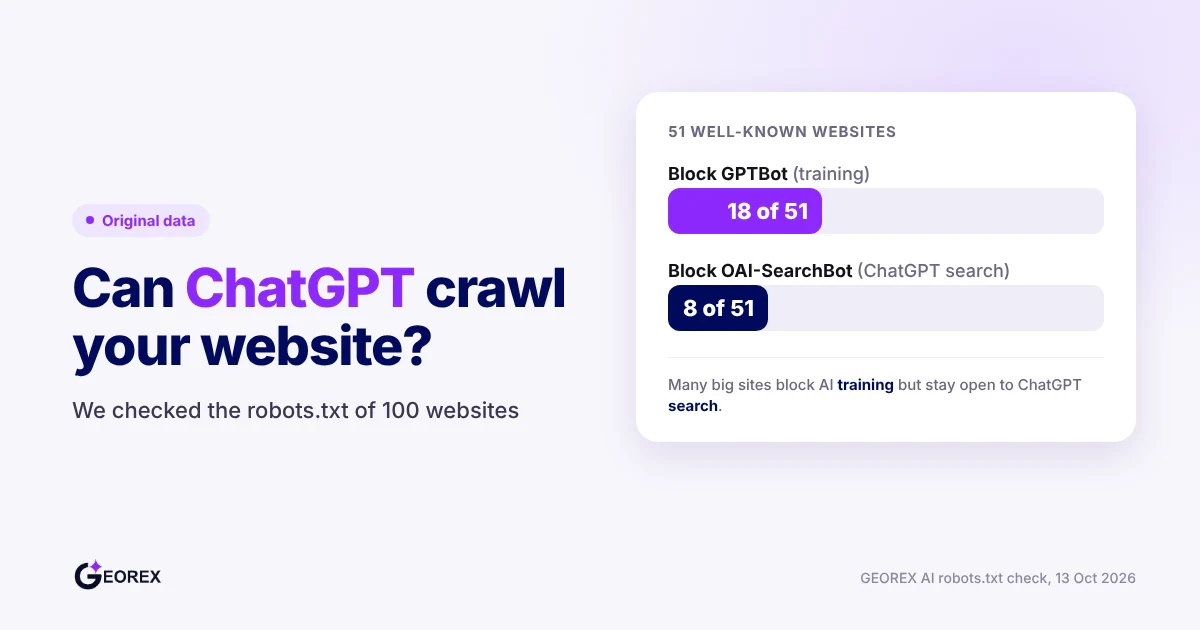
Check if ChatGPT can crawl your site by opening yoursite.com/robots.txt, checking GPTBot and OAI-SearchBot rules separately, reviewing CDN or firewall bot settings, and scanning server logs for actual GPTBot, OAI-SearchBot, ClaudeBot, or PerplexityBot requests with their HTTP status codes, since robots.txt only shows permission, not whether a visit happened. In our check of 100 websites, 18 of 51 big sites block GPTBot but only 8 block OAI-SearchBot, so blocking AI training and staying visible in ChatGPT search is a common, deliberate choice.
Key takeaways
Robots.txt shows what permission you granted AI crawlers, not whether GPTBot or OAI-SearchBot actually visited your site.
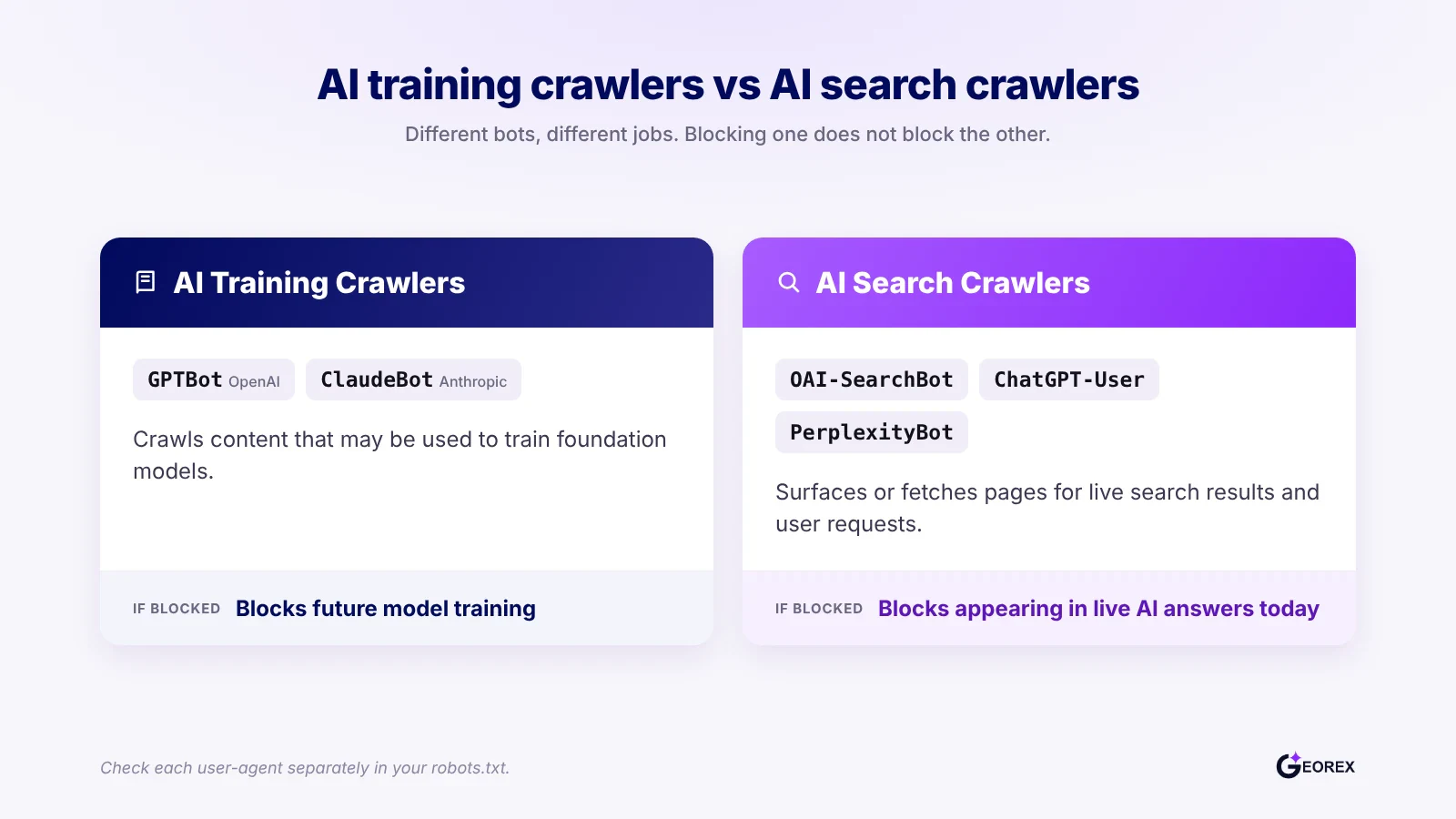
GPTBot handles content that may train OpenAI's models, while OAI-SearchBot surfaces pages in ChatGPT search, and a site can block one while allowing the other.
A CDN or firewall rule, such as Cloudflare's AI Crawl Control, can block a crawler at the network layer even when robots.txt allows it.
Confirming a real visit requires searching server or CDN logs for exact bot user-agent strings and checking HTTP status codes like 200, 403, or 429.
Most AI crawlers read raw HTML and do not execute JavaScript, so content loaded via client-side rendering may be invisible even when robots.txt says allow.
In our check of 100 websites, 18 of 51 big sites block GPTBot but only 8 block OAI-SearchBot, and none of the 46 readable brands from our AI visibility study block either one.
Can ChatGPT crawl my website? Start with this five-minute check
Answer first: what a crawl check can and cannot confirm
M. Zeeshan, Founder of GEOREX AI
Author
Founder of GEOREX AI, an AI visibility platform that tracks how brands actually appear across ChatGPT, Claude, Perplexity, and Gemini, and turns the gaps it finds into a prioritized action plan.
Free AI visibility audit
See how AI engines describe your brand today
Check ChatGPT, Gemini and Google AI Overviews in minutes. No credit card needed.
A robots.txt check tells you what permission you have granted ChatGPT's crawlers, not whether they actually visited your site. Confirming permission takes about five minutes: open your robots.txt file, find the rules for GPTBot and OAI-SearchBot, and check whether a CDN or firewall adds a second layer of blocking. Confirming an actual visit requires server or CDN logs, which the later sections of this guide cover in depth. For background on why this distinction matters for AI visibility generally, see the GEO guide.
Open your robots.txt file and scan for AI-specific user-agent rules.
Check GPTBot and OAI-SearchBot separately, since they serve different purposes.
Check your CDN or firewall for bot-blocking rules that sit outside robots.txt.
Check server or CDN logs for recent requests from these crawlers.
Use a free checker if you want the answer without doing it by hand.
Minute 1: open yoursite.com/robots.txt and find the relevant rules
Type your domain followed by /robots.txt directly into a browser, for example yoursite.com/robots.txt. Look for lines starting with "User-agent:" and read the Allow or Disallow rules listed underneath each one. A site with no AI-specific rules at all generally allows every crawler by default, which is a policy in itself, not an oversight. If you haven't set any rules yet and want a structured way to do it, the technical GEO checklist walks through the full setup.
Minutes 2-3: check GPTBot and OAI-SearchBot tokens specifically
GPTBot and OAI-SearchBot are different crawlers with different jobs. Your robots.txt file can treat them differently. OpenAI documents separate controls for the two: a site can disallow GPTBot, which OpenAI may use for model training, while still allowing OAI-SearchBot, which surfaces pages in ChatGPT search results (OpenAI).
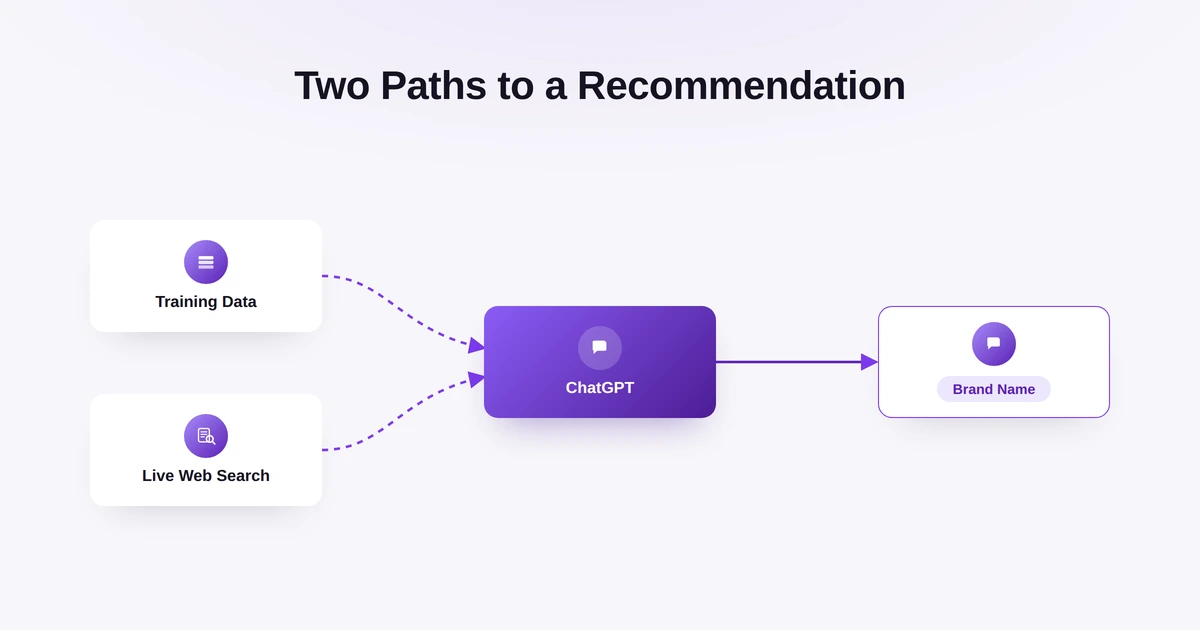
That means blocking training data collection does not automatically keep your content out of ChatGPT answers. For a sense of how citation works once a crawler can reach your pages, see how ChatGPT recommends brands.
Minute 4: check CDN or firewall controls
Robots.txt is a request, not an enforcement mechanism. A crawler can still get blocked by infrastructure even when robots.txt allows it. Cloudflare's AI Crawl Control feature, for example, lets a site owner allow or block individual AI crawlers (Cloudflare).
Blocking a crawler through this feature creates or updates a WAF custom rule that sits separately from robots.txt (Cloudflare). If your site runs behind Cloudflare, Akamai, Fastly, or a similar CDN, check its bot management or WAF settings for any rule naming GPTBot, OAI-SearchBot, ClaudeBot, or PerplexityBot. A rule here overrides a permissive robots.txt file every time.
Minute 5: look for crawler requests in server logs
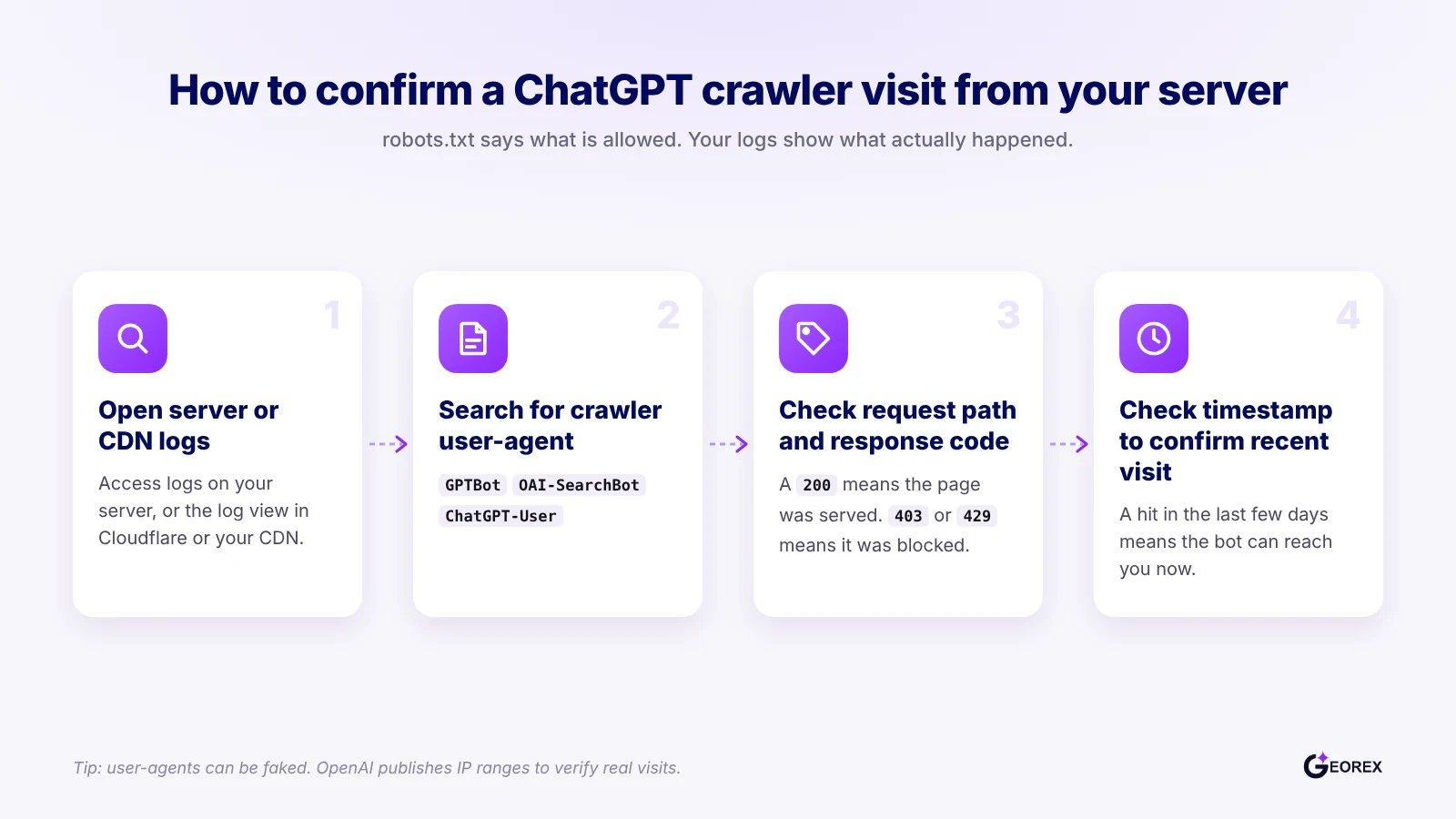
Robots.txt and firewall settings describe permission; server logs describe what actually happened. Search your access logs for the user-agent strings GPTBot, OAI-SearchBot, ClaudeBot (from Anthropic), and PerplexityBot, and note the HTTP status code returned for each request. A 200 means the crawler reached the page; a 403 or 429 means something, often a CDN rule, stopped it even though robots.txt said yes. A later section of this guide covers log checking in more detail.
Faster option: run a free AI crawler checker
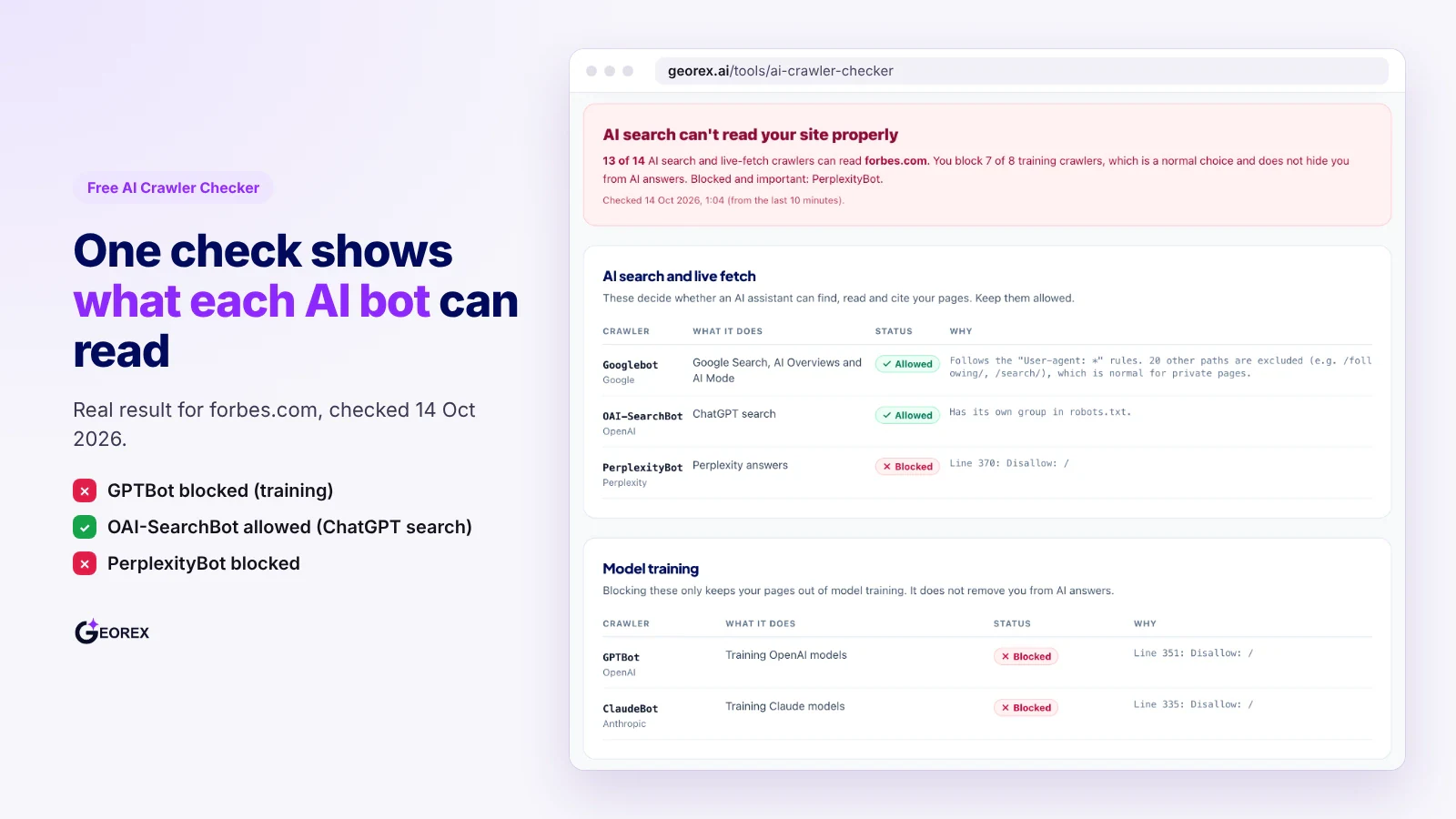
If you would rather not read robots.txt by hand, paste your domain into the free AI Crawler Checker. It reads your robots.txt and shows whether GPTBot, OAI-SearchBot, ClaudeBot, PerplexityBot and Google are allowed, with the exact line that blocks each one. It checks permission only, so you still need the CDN and log checks above.
How do I read my robots.txt rules for GPTBot and OAI-SearchBot?
Reading your robots.txt file correctly means finding the exact user-agent block for each AI crawler and checking which directive follows it. Here is the step-by-step process.
Find the live file and locate the user-agent blocks
Open a browser and go to yoursite.com/robots.txt. Always check the live, published file, not a staging copy or a version in your CMS editor.
Scan for lines that start with User-agent:. Each block groups one or more crawler names with the Allow or Disallow rules that apply to them.
Note that a blank line usually separates one user-agent block from the next. A rule placed under the wrong block does nothing for the crawler you meant to control.
Match tokens exactly: GPTBot versus OAI-SearchBot versus ChatGPT-User
Search for the exact string GPTBot. OpenAI uses this token for the crawler that collects content that may be used to train its models (OpenAI).
Search separately for OAI-SearchBot. This is the crawler that finds pages for ChatGPT search, and OpenAI recommends allowing it if you want to appear there (OpenAI).
Look for ChatGPT-User as a third entry. OpenAI uses it for some visits a user asks ChatGPT to make, not automatic crawling, and notes it may not follow robots.txt rules (OpenAI).
Recheck after publishing a change
After editing robots.txt, reload the live file to confirm the new rule actually saved and deployed.
Wait roughly a day before assuming the change worked for ChatGPT search. OpenAI states that robots.txt edits can take about 24 hours to take effect for OAI-SearchBot (OpenAI).
If the rule still doesn't match after a day, check for CDN or firewall rules overriding robots.txt, which is a separate layer covered later in this guide.
What's the difference between AI training crawlers and AI search crawlers?
Training crawlers and search crawlers serve different purposes, so you can block one group while allowing the other. Check your robots.txt rules, server or CDN logs, and page content before deciding what to allow.
Training crawlers: content that may contribute to model training
GPTBot and ClaudeBot are used to crawl content that may contribute to model training, but blocking them only disallows their crawling under that robots.txt rule. OpenAI describes GPTBot as a crawler for content that may be used to train its foundation models (OpenAI crawler documentation); Anthropic describes ClaudeBot as a crawler for content that could contribute to training (Anthropic).
Search and answer crawlers: content used to generate or ground an answer
Search and answer crawlers fetch pages to show in search results or to ground an answer, which is a different job from training. OpenAI documents separate controls for GPTBot and OAI-SearchBot, so a site can block one and allow the other (OpenAI crawler documentation). Anthropic also separates Claude-SearchBot from ClaudeBot, and Perplexity says PerplexityBot surfaces and links websites in its search results rather than collecting content for model training (Perplexity).
What do 100 well-known websites actually allow? Our robots.txt check
On 13 October 2026 we read the robots.txt files of 100 websites to see how real sites treat AI crawlers. The sample has two parts: 49 brands from our AI brand visibility study (one study site could not be opened) and 51 well-known high-traffic sites, including 13 news and media sites such as The New York Times, the BBC and Reuters, plus sites such as Amazon, Airbnb, LinkedIn and Shopify. For each site we checked 12 crawlers and counted a crawler as blocked when the rules shut it out of the whole site. 97 of the 100 files were readable.
Key findings from the 100 sites
None of the 46 readable study brands block GPTBot or OAI-SearchBot: Yet in our study, ChatGPT named these brands in only 31% of real buyer questions. For most brands, crawl access is not what keeps them out of AI answers.
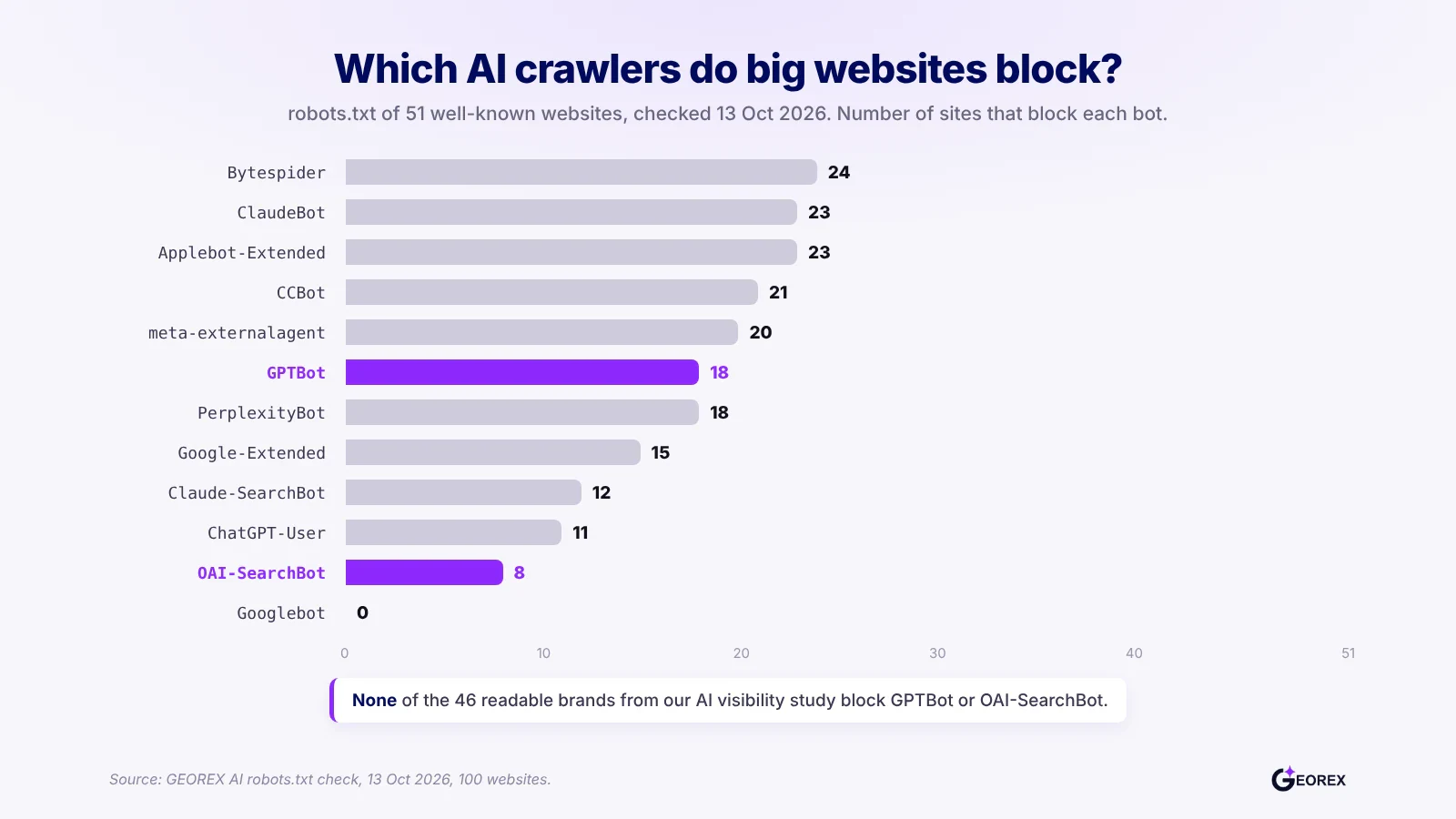
Big sites block training far more often than search: Of the 51 big sites, 18 block GPTBot but only 8 block OAI-SearchBot. Ten of them, including Reuters, Forbes, Bloomberg, Airbnb, eBay and LinkedIn, block GPTBot while leaving ChatGPT search open.
News sites shut out Claude more than ChatGPT search: All 13 news and media sites block ClaudeBot, Applebot-Extended and Bytespider, but only 3 of the 13 (The New York Times, the BBC and CNN) block OAI-SearchBot.
Nobody blocks Googlebot: Not one of the 97 readable sites blocks Google's main crawler, which is also the crawler behind AI Overviews.
Some robots.txt files sit behind bot protection: For 3 study brands, robots.txt returned an "Access Denied" or Cloudflare block page even to a normal browser, and 2 more showed a bot check first. If a crawler cannot read your robots.txt, you are no longer the one deciding what it may crawl.
Big sites block AI training crawlers far more often than ChatGPT search.
Which AI crawlers do websites block?
Number of sites that block each crawler from the whole site. The 13 news and media sites are also counted in the 51 big sites.
Crawler
51 big sites
13 news and media sites
46 study brands
GPTBot
18
8
0
OAI-SearchBot
8
3
0
ChatGPT-User
11
5
0
ClaudeBot
23
13
0
Claude-SearchBot
12
How we counted: for each crawler we used the rule group that names it, or the * group if none does, and applied the longest matching rule to the homepage path. Sites that only block some folders are not counted as blocked. Robots.txt files change, so treat this as a snapshot from 13 October 2026.
What this means for you: the big sites show that blocking training and allowing search is a normal, deliberate choice. If you want to be named in ChatGPT answers, keep OAI-SearchBot open, run the five-minute check above on your own site, and then spend your effort on the content and mentions that make AI recommend you.
Which other AI crawlers should I check at the same time?
Check search, training, and user-requested bots separately; each can have different access rules. GPTBot may crawl content for training, while OAI-SearchBot supports search and ChatGPT-User fetches pages for some user requests (OpenAI).
Quick reference table: AI crawlers by company and purpose
Token
Company
What it does
GPTBot
OpenAI
Collects content that may be used to train OpenAI models
OAI-SearchBot
OpenAI
Finds pages for ChatGPT search answers
ChatGPT-User
OpenAI
Visits a page when a user asks ChatGPT to; may not follow robots.txt
No. Google says AI Overviews use pages crawled by normal Googlebot, so the rules that keep you in Google Search also keep you eligible for AI Overviews (Google). Google-Extended only controls whether your content is used for Gemini training and some grounding. Blocking it will not remove you from AI Overviews, and blocking Googlebot would also hurt your normal search results.
What robots.txt rules should I use to allow or block AI crawlers?
Robots.txt sets your preferences for each crawler. The three examples below cover the most common choices. Whichever you pick, check your CDN or firewall afterwards, because either can still block a bot that robots.txt allows.
Example 1: allow all AI crawlers (the default)
To allow crawlers, leave them unblocked or use a broad allow rule; robots.txt allows access by default.
code snippet
User-agent: *
Allow: /
Example 2: block training only, leave search untouched
To block OpenAI and Anthropic training crawlers while allowing search, disallow GPTBot and ClaudeBot only.
Add Google-Extended to this list only if you also want to opt out of Gemini training. It does not affect Google Search or AI Overviews.
Example 3: block AI crawlers but keep Google Search
To ask the AI crawlers in the table above to stay away while Google Search keeps working, name each one. Googlebot is not on the list, so your Google results and AI Overviews are not affected. This also keeps you out of ChatGPT, Claude and Perplexity answers, so most businesses should not use it.
How do I confirm an AI crawler actually visited my site?
A server or CDN log entry with a matching user-agent confirms a request, while robots.txt only shows your stated rules. Check the request path, response code, and timestamp before deciding whether access worked.
Search server or CDN logs for documented user-agent strings
Search raw access logs from your hosting panel, server, or CDN dashboard. Match the documented token rather than a brand name, then inspect the status code: 200 indicates a successful HTTP response, while 403 or 429 indicates denial or throttling. Repeated requests confirm repeated visits, not indexing. For more context on how access affects visibility, see the technical GEO checklist and how ChatGPT recommends brands.
What it means if you see hits from ChatGPT-User or Perplexity-User
A hit from ChatGPT-User can reflect a user-initiated visit, not routine crawling. OpenAI says this agent may not follow robots.txt rules. Check the request path and response code, but do not treat that hit alone as evidence of ongoing crawler activity.
Why a crawler can get a 403 even when robots.txt allows it
A firewall, CDN, rate limiter or bot-management rule can block a request even when robots.txt allows it, because robots.txt does not control those network-layer decisions. Check the bot's robots.txt group and your security logs for the same timestamp.
Checking Cloudflare or another CDN/WAF for bot rules
Check your CDN or web application firewall (WAF) for rules that match or block AI crawlers. In Cloudflare, AI Crawl Control can allow or block each crawler through WAF custom rules, so a bot can be blocked even when robots.txt allows it (Cloudflare). Also compare CDN logs with your origin server logs: a request blocked at the CDN never reaches your server.
Does allowing a crawler in robots.txt guarantee it can read my content?
No. A robots.txt allow rule only grants permission to fetch a page. It says nothing about whether the crawler can see the content once it loads the HTML.
JavaScript-rendered content may be invisible to AI crawlers
Most AI crawlers fetch the raw HTML of a page and do not run JavaScript. Google can render JavaScript for Search, but its own guide notes that not all bots can (Google Search Central). So a product page that loads its description, pricing or reviews with JavaScript may give an AI crawler an almost empty page, even when robots.txt says allow.
Server-rendered or static HTML is the safer baseline
The safer approach is to serve your main content in the first HTML response, using server-side rendering, static generation or pre-rendering, instead of building it in the browser. Google recommends these methods in its JavaScript SEO guide. A quick test: open the page, choose View Source, and search for a sentence from your main content. If it is not in the source, many AI crawlers will not see it either.
What should I fix first if AI crawlers are blocked?
Fix the search and answer crawlers first, not the training crawlers. Blocking OAI-SearchBot, ChatGPT-User, Claude-SearchBot, or PerplexityBot stops your pages from appearing in live AI answers today. Blocking GPTBot or ClaudeBot only affects future model training, which matters far less for a brand trying to get cited now.
Unblock AI search bots before anything else
Open yoursite.com/robots.txt and look for any Disallow line sitting under OAI-SearchBot, ChatGPT-User, Claude-SearchBot, or PerplexityBot. If one of those user-agents is disallowed on /, remove the rule or narrow it to a specific path, such as /admin/, rather than the whole site. A site can keep GPTBot and ClaudeBot blocked from training while still allowing OAI-SearchBot and PerplexityBot to read and cite pages, so there's no need to open everything at once.
Then work through the rest of the technical GEO checklist
Once search bots can reach your pages, check the other basics that decide whether AI can read and quote you: main content in the HTML, clear headings, schema and an up-to-date sitemap. The technical GEO checklist covers each one step by step.
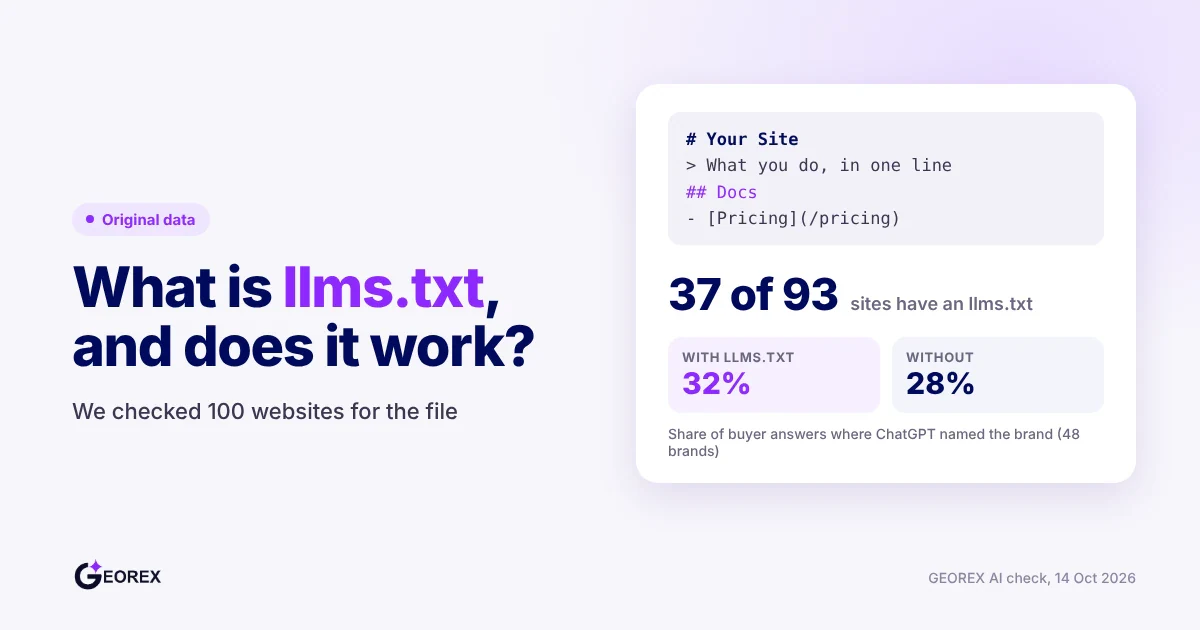
Not directly. An llms.txt file is a short guide to your most important pages, written for AI tools. It does not allow or block crawlers the way robots.txt does, and OpenAI's crawler documentation only describes robots.txt controls. If you want one anyway, the free llms.txt generator builds it in a minute. Fix robots.txt and firewall access first.
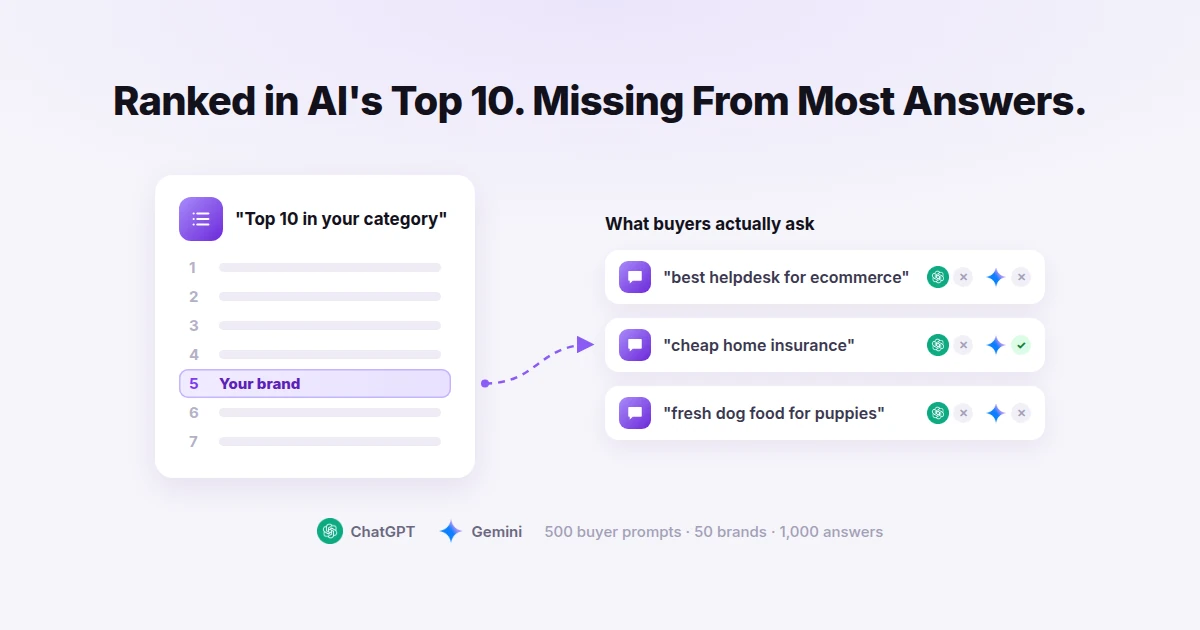
We Asked ChatGPT and Gemini 500 Buyer Questions. Their Own Top-10 Brands Were Missing Most of the Time
We took 50 brands that ChatGPT and Gemini rank in their own top-10 lists and asked both apps the questions real buyers type. Most of the time, the brand was not named.