
Loading
Loading
Loading
Loading
The Prompts, Competitors and Citations pages show what AI says. AI Traffic shows what AI does on your website: which AI crawlers and assistants request your pages, which pages they take, whether your server or firewall turns them away, and how many people arrive on your site by clicking a link inside an AI answer. Because this happens on your own server, the data has to come from there: a small snippet at your edge, or a server log you upload. Available on paid plans.
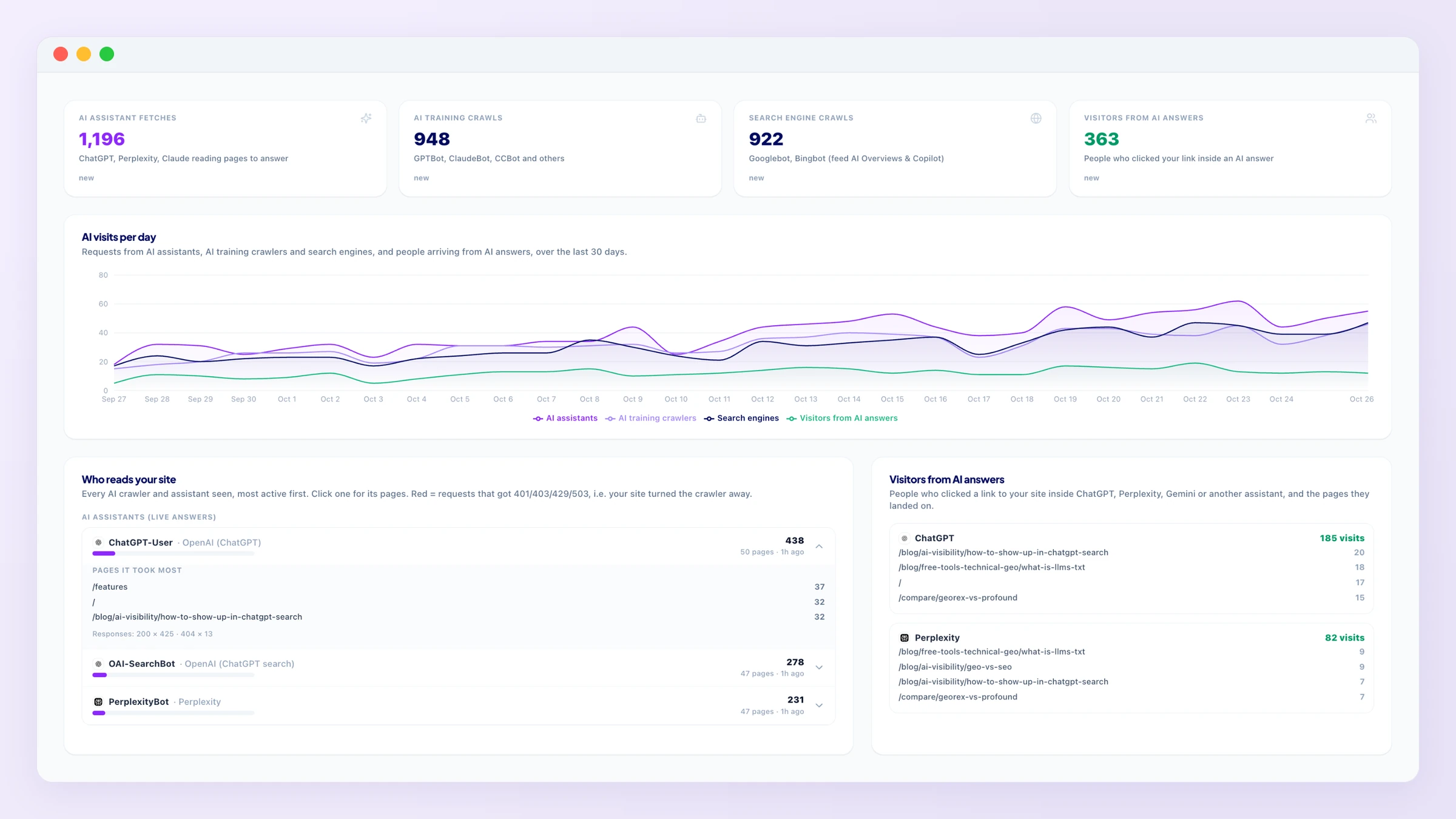
Four counters for the chosen period (7, 30 or 90 days), each compared with the period before: AI assistant fetches (ChatGPT-User, OAI-SearchBot, PerplexityBot, Claude-User and others reading a page to answer a question right now), AI training crawls (GPTBot, ClaudeBot, CCBot, Bytespider and others collecting pages for model training), search engine crawls (Googlebot and Bingbot, which also feed Google AI Overviews and Copilot) and visitors from AI answers (people whose browser arrived from chatgpt.com, perplexity.ai, gemini.google.com, claude.ai, copilot.microsoft.com and other assistants). A chart shows all four per day.
Who reads your site lists every crawler seen, grouped by kind and most active first. Click one for the pages it took most and the response codes it got; a red “blocked” count means your site answered 401, 403, 429 or 503 to that crawler, i.e. a firewall or bot protection turned it away. Visitors from AI answersshows each assistant with the pages people landed on. Pages AI cites vs pages it fetches takes the pages of your site that the tracked AI answers link to (from the Citations page) and shows how often an AI assistant actually fetched each one in the period: a page that is cited but never fetched is being quoted from an old copy, so update it and make sure it is not blocked. If your robots.txt blocks a search or assistant crawler, a warning says so.
Open Connection settings (it is the whole page until the first data arrives) and pick the option that matches your hosting. Every snippet is pre-filled with your project's key and reports only requests from AI crawlers, assistants and AI-referred visitors: no personal data and no page views of ordinary visitors ever leave your site.
*yourdomain.com/*. The Worker passes every request straight through and reports in the background.middleware.js for React sites built with Next.js (Vercel, Netlify or your own server). If you already have a middleware, copy the reportToGeorex() call into it.functions.php; events are sent in small batches..gz accepted). Only the AI and bot lines are kept, counted per day and page; the file itself is not stored. Upload a newer file whenever you want to refresh.The key under the snippet identifies your project. New key issues a fresh one and stops the old one at once: update the snippet on your site afterwards. Data appears within a minute of the first AI visit.
Hosted builders such as Shopify, Wix and Squarespace do not let you add server code, and many sites run bot protection that silently blocks AI crawlers. The reachability check needs no setup: GEOREX requests your home page, robots.txt and the pages AI cites most (up to six) the way each AI crawler does, with its real User-Agent, and compares the answer with a normal browser. Green is a normal page; red is a 403, 429, 503 or a bot-challenge page, which means that assistant cannot read your site at all. Once a day per domain. If a crawler is blocked, allow it in your firewall or bot protection (on Cloudflare: Security → Bots, allow verified bots, or a WAF rule that lets these user agents through).
What is stored
If an assistant fetches your pages but never cites you, the content is the problem: the Growth Tasks board has the page-level fixes. If an assistant never fetches your pages at all, start with the reachability check and the robots.txt task, then watch this page after the next update. The Citations page shows which of your pages AI already quotes.