
Overview & GEO Health Score
The Overview page is what you land on after logging in, one screen that summarizes everything else in your dashboard: your GEO Health Score, a 12-dimension Category Health breakdown, your task pipeline status, competitor share of voice, and a citations graph.
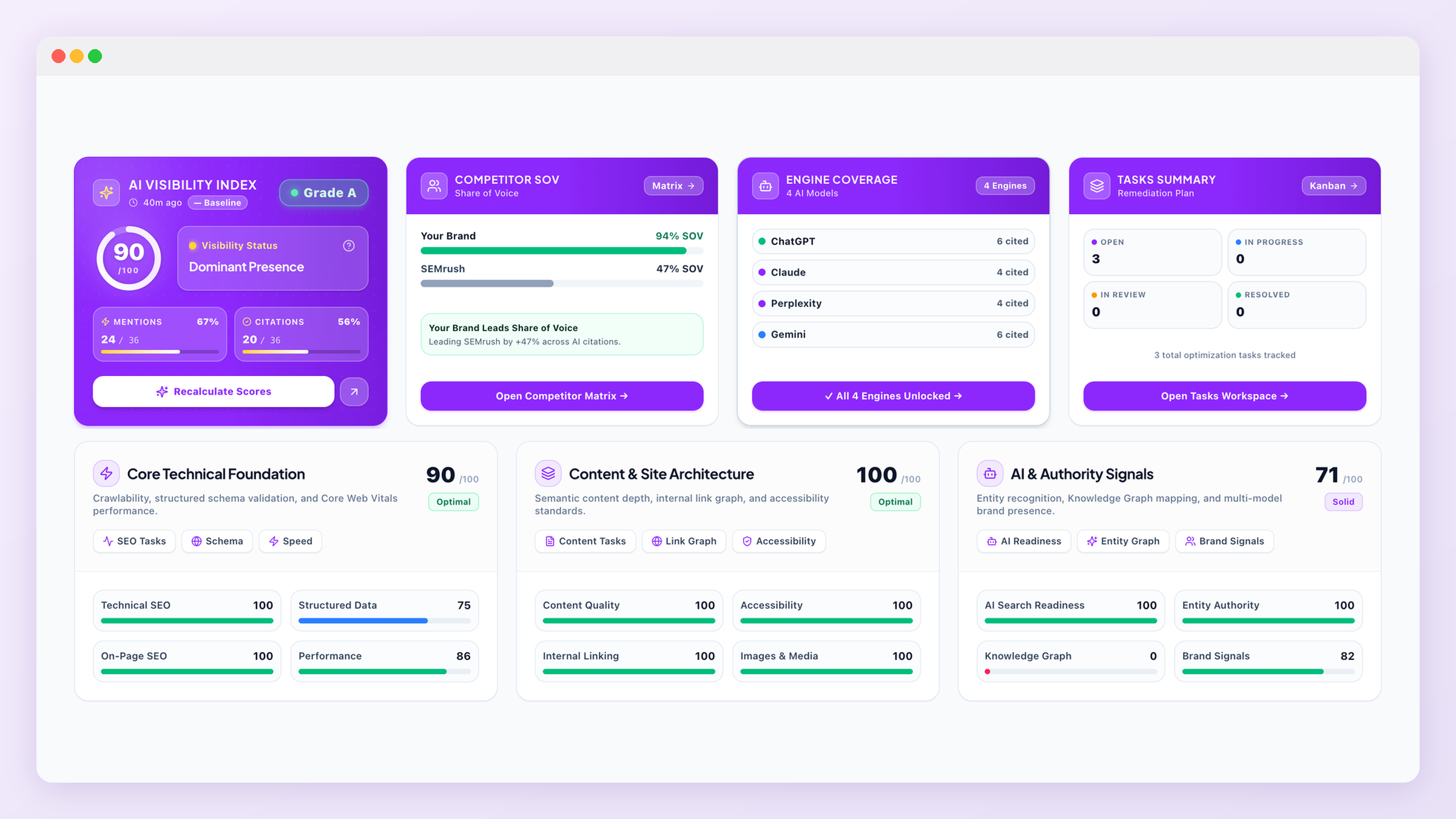
GEO Health Score
A single number that summarizes how visible and technically ready your brand is across the AI engines GEOREX tracks. It moves when your Share of Voice changes, when your technical health improves, or when tasks tied to real evidence get resolved, it doesn't move on its own between scans.
Category Health: 12 dimensions, 3 groups
All 12 dimensions render on your dashboard at once, none of them are hidden behind a "view more" toggle.
| Group | Dimensions |
|---|---|
| Core Technical Foundation (the four headline dimensions) | Technical SEO, Structured Data, On-Page SEO, Performance |
| Content & Site Architecture | Content Quality, Accessibility, Internal Linking, Images & Media |
| AI & Authority Signals (tracked separately, doesn't feed the Technical Foundation score itself) | AI Search Readiness, Entity Authority, Knowledge Graph, Brand Signals |
AI & Authority Signals is reported independently from the Technical Foundation score, so a strong AI-readiness score never masks a real technical problem, or the reverse.
The three scan actions
Exactly three actions in GEOREX ever trigger AI engine activity or recalculate your score:
- Run Campaign Scan (manual, header button) — re-scans all engines your plan includes, re-discovers competitors, and regenerates tasks. Frequency is limited by your plan (see Plans & Pricing).
- Automatic post-payment rescan — runs once automatically right after you upgrade, so your new engine coverage shows up immediately instead of waiting for the next scheduled scan.
- Recalculate Score — re-crawls your site and re-checks task status without running a new AI engine scan. Use this after fixing a task to see your score update without waiting for or using up a full rescan.
Free tier scope
What's next
Drill into Prompts to see exactly which questions are being tracked, or jump straight to Tasks to start fixing what the scan found.