Being mentioned by an AI engine and being cited as a source are different outcomes with different fixes. Citations is where you see, per domain and per engine, who's actually being pointed to as the answer, not just named in passing.
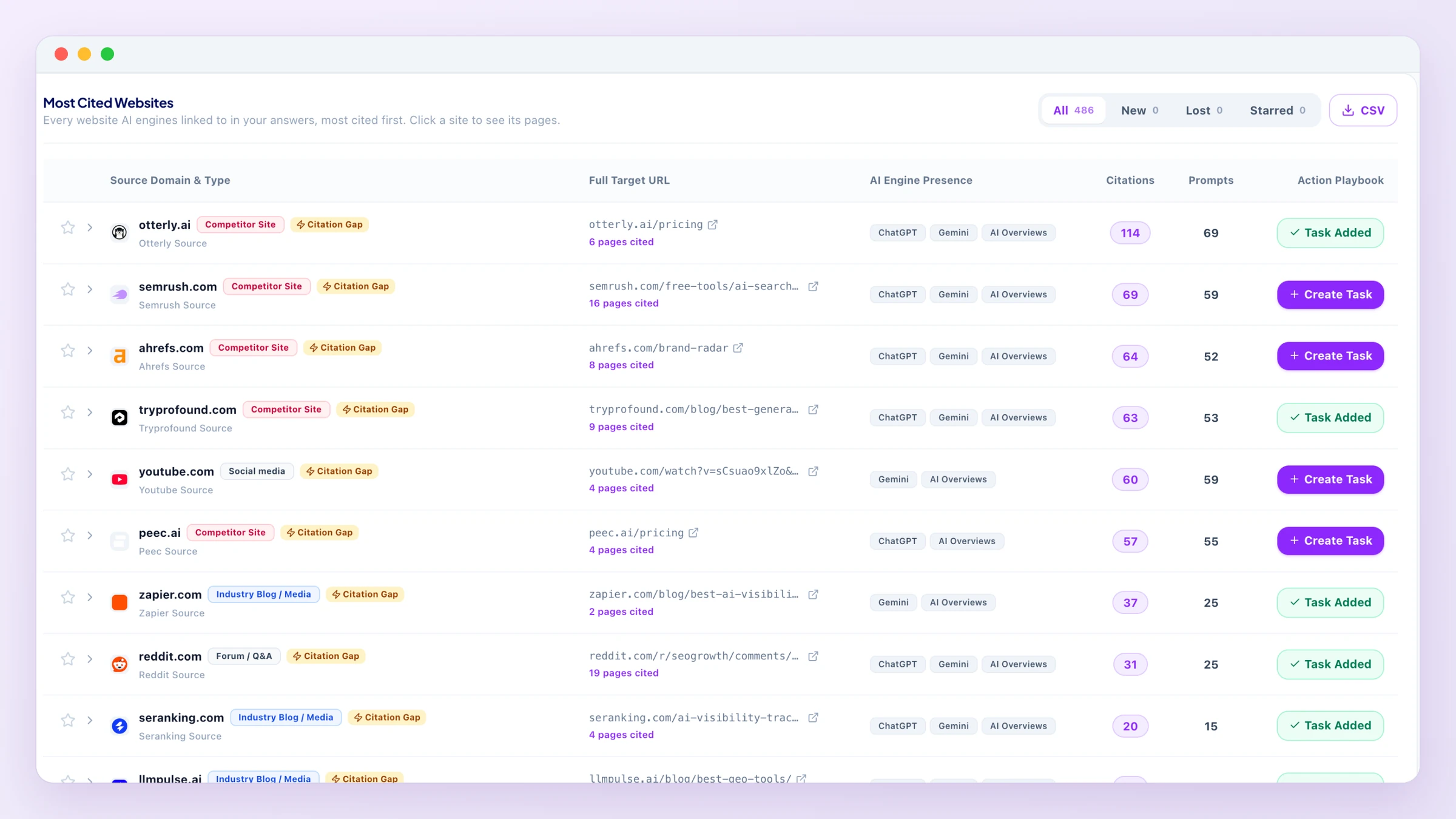
Video walkthrough with voice-over (1:27): CitationsCitations leaderboard: each website AI engines cite, with the engines that cited it
How to read the leaderboard
Each row is a website that AI engines cited as a source in answers to your tracked prompts, with the exact page (when a site has several cited pages, open "pages cited" under the link to see them all, most cited first), how many times it was cited, and its type (for example a review site, industry media or a competitor's site). The AI Engine Presence column shows a badge for each engine that cited it: ChatGPT, Gemini, Google AI Overviews, Perplexity or Claude (the engines on your plan). That tells you whether a source matters broadly or to just one engine.
Filter by AI engine or by Source Category (Review Sites, Marketplaces, Online Stores, Forums & Social, Industry Media, Competitor Sites), or click Filter Opportunities to see only the sources marked Citation Gap: places where getting listed or mentioned could bring you into AI answers.
Click Create Task on a row to open its playbook: a short plan and a ready-to-use draft that fits the type of site (an email to the author for a media page, a profile checklist for a review site, a comparison-page outline for a competitor's site). If you sell products, other online stores that AI quotes are shown as Online Stores: they sell the same things and will not list you, so their playbook helps you cover the same products on your own site instead of writing to them. Use Copy to copy the draft, or Add to Growth Tasks to save it as a task.
Image links, icons and the AI app's own links (such as ChatGPT's thumbnails) are not counted: only pages an answer really used as a source.
During the free trial the top 3 sources are unlocked; a paid plan shows all of them.
Pages, prompts, and the New / Lost / Starred views
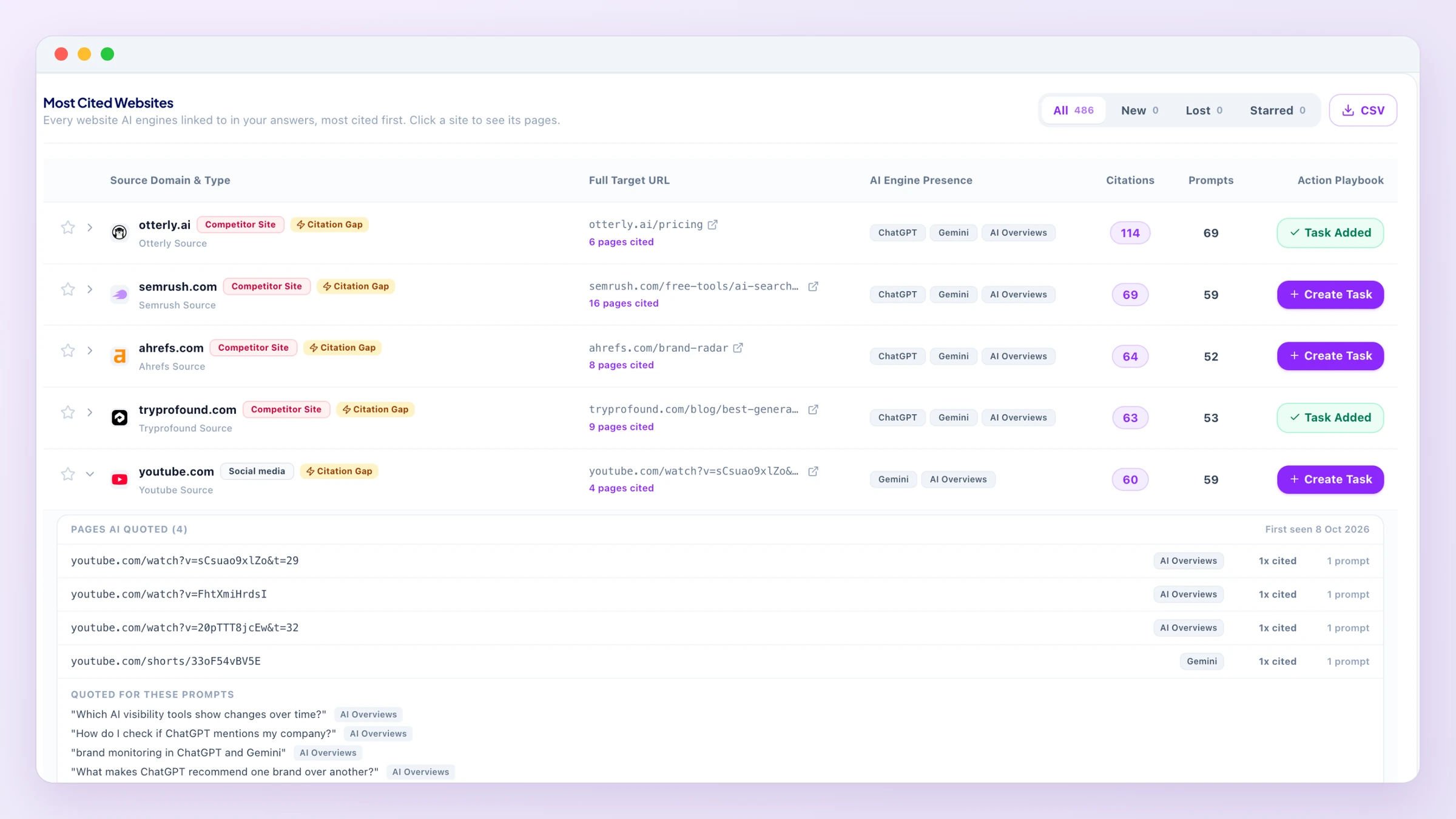
Click a site row to open it: every page of that site the answers linked, with the engines that used it, how many times it was cited and in how many prompts, followed by the prompts it was quoted for. ThePrompts column shows that count on the row itself.
All is the full leaderboard. New shows sites first seen in your answers in the last 7 days (a New badge marks them in the list too). Lost shows sites AI quoted in the last 30 days that no current answer links any more, with when they were first and last seen. Starred shows the sites you starred with the star on a row, so you can keep an eye on them.
History starts the day the page was first opened after this update: a site that was already there is never shown as new, and Lost fills in as sites drop out of the answers.
CSV downloads one row per site and page (engines, times cited, prompts, first and last seen, starred, new or lost) with the engine filter you have on. Available on paid plans.
A site opened: the pages AI quoted, the engines that used each one, and the prompts behind them
Why mention and citation are tracked separately
A brand can be mentioned in an AI answer without being the source the engine actually points to, or credits. That is why the dashboard shows AI Visibility (named or shown) and Cited (your website shown as a link or source) as two separate numbers, not one blended score.
What's next
Citation gaps found here are exactly the kind of evidence that generates a task, see Growth Tasks for how that pipeline works.